
Check which nameservers the parent zone delegates to, then confirm those servers answer for your domain. If both are correct, look at DNSSEC validation and cached resolver answers. If DNS resolves but the site stays down, check the hosting or TLS service. Fix the first layer that fails, then retest the hostname and any services that depend on it.
A nameserver change affects how the internet finds the DNS records for your domain. The failure happens in one of three places: before a resolver reaches your new provider, inside the provider’s zone, or after DNS has already sent the browser to the website. For TTL values and resolver caching, see the DNS TTL and resolver caching explanation.
| Observed result | Likely failing layer | Distinguishing test | Responsible owner / next safe action |
|---|---|---|---|
| Parent still lists old or unexpected NS | Parent delegation | Trace parent-zone NS | Registrar: correct the delegated NS set if wrong |
| Parent NS is correct, but a delegated server has no working zone | Authoritative zone or server | Query its SOA and answer flags | DNS host: repair missing zone or unresponsive service |
A recursive resolver returns NXDOMAIN |
Name absence or cached negative answer | Compare exact name with delegated authority | DNS host if authoritative data is wrong; resolver/cache investigation if it is correct |
NOERROR without requested address records |
Type-specific answer or negative response | Inspect answer, authority, SOA and alias behavior | DNS host: restore needed record only if confirmed absent |
A validating resolver returns SERVFAIL |
DNSSEC or upstream resolution failure | Compare authority, EDE and DNSSEC checking-disabled result | DNS operator / registrar: repair the confirmed source of failure |
| Authoritative answers are correct, but recursive answers differ | Recursive caching | Match queried name/type and inspect TTL | Resolver or cache owner: allow expiry or investigate persistent failure |
| DNS reaches the intended address, but HTTPS fails | Hosting, TLS or application | Inspect HTTPS response and certificate | Website / TLS provider: fix the service, keep correct DNS unchanged |
The authoritative answer is the dividing line. When delegation and the live zone are correct, more DNS changes will not fix a failing certificate or application.
Is the failure DNS, or is the website itself down?

A generic browser connection error fits several failures, so note the exact hostname (example.com or www.example.com) and the error the browser shows. A lookup that returns NXDOMAIN, SERVFAIL or a timeout sends you down a different path than an HTTPS certificate warning on an address that already resolved. Write down the error, the time, the nameserver change you made and the network you tested from. Then run a read-only lookup: dig example.com A, or Resolve-DnsName example.com -Type A on Windows.
Check the nameservers published by the parent zone

Your registrar account shows the nameservers you entered. Resolvers follow the delegation published by the parent zone, which is a top-level-domain zone such as .com. Its NS records point queries to your domain’s authoritative nameservers.
Three sets of nameserver data exist at once: the registrar’s setting, the NS records published by the parent, and the NS records in the domain’s own zone. The parent’s delegation tells you whether the change has taken effect publicly.
Cloudflare documents a trace that follows the delegation path:
dig +trace example.com NS +noall +authority +nodnssec
For a .com domain, you can query a .com server directly:
nslookup -type=ns -debug example.com a.gtld-servers.net
Replace example.com with your domain. Compare the parent’s nameserver hostnames with the full set your new provider assigned. If the parent still lists the old provider, or a mix of old and new, ask your registrar to correct the delegation. The trace output is your evidence.

An old nameserver can keep serving a copy of the zone after it leaves the public delegation, so querying it directly gives misleading results.
A domain owner moving to Vultr described the confusion:
When I didn’t specify any server to do the checking against (authoritative server), I got a completely different output than when I did specify the server. Why is that? The new custom nameservers are listed at the top, and registrar’s servers are listed below that. Is this normal behavior in DNS? When I run `-Type NS -Server dns1.registrar-servers.com` I am expecting to see `ns1.vultr.com` in the output. Why is this not happening? Is it because “authoritative servers” don’t do dual duty as “recursive resolvers” as well?
The old dns1.registrar-servers.com answer showed only what that server still knew about the domain. Resolvers go there only if the parent delegation sends them.
Custom nameservers with hostnames inside your own domain need glue records at the parent. Nameservers hosted under another domain do not.
Query every delegated authoritative server and the active DNS zone
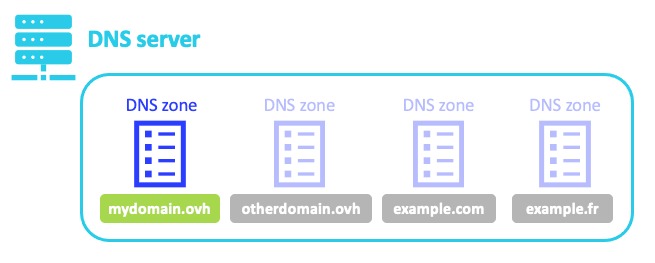
A correct delegation can still point to nameservers with no working zone for your domain. The new provider needs the zone configured, and every delegated server must answer queries for it.
Take the nameservers the parent returned and query each one directly. The hostname below is a placeholder, not a real provider endpoint.
dig @ns1.provider.example example.com SOA +norecurse
dig @ns1.provider.example example.com NS +norecurse
dig @ns1.provider.example example.com A +norecurse
dig @ns1.provider.example www.example.com CNAME +norecurse
Repeat the checks against every delegated server with its real hostname. Read the response status, the answer and authority sections, and the authoritative-answer (aa) flag.
An SOA answer shows the server is serving the zone. If a delegated server refuses the query, times out or lacks the zone, your DNS host has to fix its configuration or service. A recursive resolver can turn that upstream refusal into SERVFAIL, as Google’s Public DNS troubleshooting documentation illustrates.
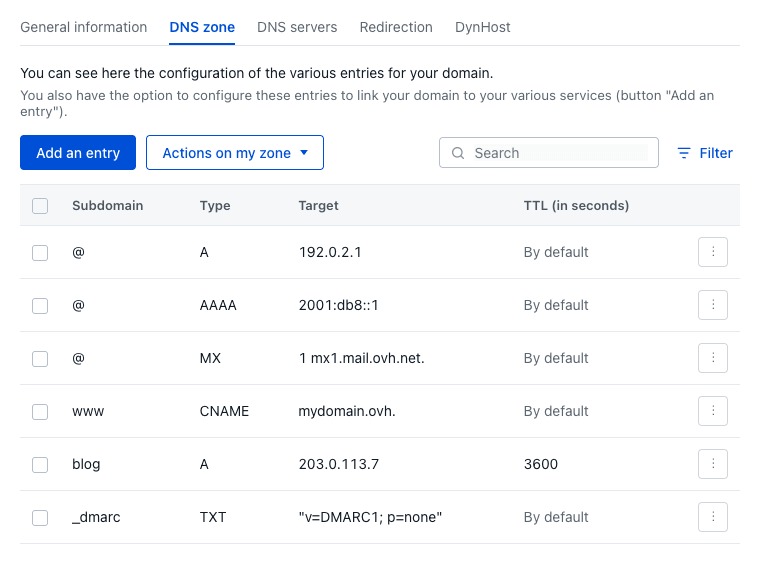
The hostname matters as much as the record type. The apex may have an A record while www uses a CNAME. An AAAA record supplies an IPv6 address, so compare IPv4 and IPv6 results separately when symptoms differ.
A DNS dashboard keeps accepting edits even after its provider stops being authoritative. Public resolvers never see those changes.
One administrator trying to configure Zoho Campaigns described an inherited DNS arrangement:
DreamHost shows a full DNS zone and lets you edit records, but clearly states:“All changes will be applied after you change the nameservers” Zoho DKIM/SPF records were added in DreamHost, but Zoho can’t see them (expected, since Cloudflare is authoritative) No one internally has a Cloudflare login Owner believes “everything is managed in DreamHost” and is confused why DNS edits don’t propagate Cloudflare account was likely created 10+ years ago by a former SEO/dev/vendor and never transferred
Cloudflare was the delegated authority, but the administrator edited a DreamHost zone. The Zoho records never reached public resolvers.
The account also ran Google Workspace mail and a Shopify site, so an unplanned switch of authority carried real risk.
Start with the provider the parent delegation names. If you have no login there, recover the account or contact whoever holds it.
Interpret NXDOMAIN, NOERROR/NODATA, SERVFAIL, REFUSED and timeouts
A response code means different things depending on the hostname, record type and server that returned it. After a migration, the difference between a name that does not exist and a name that lacks one record type matters most.
| Result | Meaning | What distinguishes the cause |
|---|---|---|
NXDOMAIN |
The responding server reports that the queried name does not exist | Compare the exact name with the live authoritative response |
NOERROR without the requested RRset |
NODATA, when the authoritative negative response shows the requested RRset is absent | Inspect answer and authority/SOA; account for referrals and CNAMEs |
SERVFAIL |
The resolver could not complete the resolution successfully | Examine authoritative health, DNSSEC validation and any extended error detail |
REFUSED |
A server refused the particular DNS request | Determine which server refused it and whether it should serve the zone |
| Timeout | No usable response arrived within the query’s timeout | Examine reachability and the affected server or network path |
RFC 2308 separates negative answers for a nonexistent name from those for an absent record type. The distinction matters when you create an A record after a lookup for that name was already cached as nonexistent.
Several mechanisms produce SERVFAIL. Google Public DNS documents cases involving DNSSEC validation and cases where delegated authoritative servers refuse to answer.
Google Public DNS reports EDE 9 (DNSKEY Missing) for a DNSSEC problem and EDE 22 (No Reachable Authority) when it gets no usable authoritative response. These codes can accompany SERVFAIL, but resolvers do not show them in every failed lookup.
Check whether DNSSEC validation broke during the nameserver change
DNSSEC can make a newly delegated domain unreachable to validating resolvers even when its authoritative nameservers answer normally. This happens when the chain of trust no longer matches the configuration the parent delegates to.
A DNSSEC-enabled domain has a delegation signer (DS) record at the parent, which anchors a trust chain through the child zone’s DNSKEY records and signatures. When a domain moves between DNS providers, the published DS can stop matching the new operator’s keys.
A validating recursive resolver then returns SERVFAIL.
Say a provider signed your zone. The registrar switches the delegation to another provider, but the parent keeps the old DS. The new nameservers answer direct queries, yet validating resolvers fail to build trust.
Screen for this by running the same query normally and with the checking-disabled flag:
dig @1.1.1.1 example.com A
dig @1.1.1.1 example.com A +cd
If the normal query fails and the +cd query returns an answer, the trust chain is broken. The contrast does not show which record is wrong.
The checking-disabled flag is a query option. It does not turn off DNSSEC for the domain.
Inspect the parent DS first with:
dig example.com DS
This is a recursive lookup. To confirm a mismatch, you also need to check the DS published at the parent against the child zone’s keys and signatures.
Cloudflare’s DNSSEC troubleshooting documentation describes stale DS records, validation failures and the risks of changing DNSSEC material during a transition.
Do not delete DS or DNSKEY records just because a resolver returned SERVFAIL. An uncoordinated change can cause a new validation failure or break an intended DNSSEC setup.
Save the failed and checking-disabled results, check the parent DS and child DNSKEY, and run a validator such as DNSViz. Your registrar and DNS operator then fix the chain of trust together.
You have a DNSSEC problem when three things agree: the authoritative zone responds, validating resolution fails, and the parent and child security records do not match. If the authoritative nameservers refuse or time out, that is a separate availability problem.
Know when to wait for DNS caching and when not to
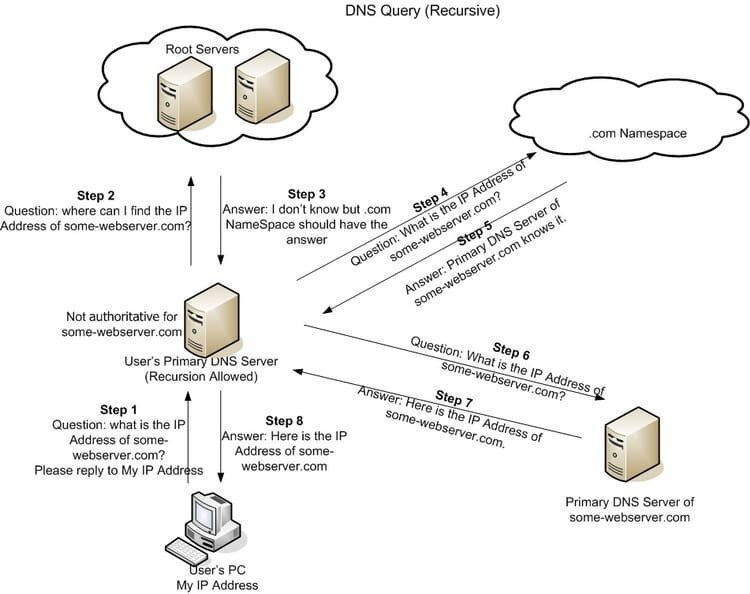
Wait only when the parent delegation and authoritative DNS are correct but a recursive resolver still returns an older answer. A broken authoritative configuration has to be fixed at its source.
Recursive resolvers cache DNS data and keep serving it until the entry expires. That includes some negative answers.
RFC 2308, published in March 1998, describes negative caching for DNS queries. RFC 9520 also addresses caching of resolution failures, including certain failures involving DNSSEC validation.
Suppose your new authoritative nameservers now serve the A record for www.example.com, but one recursive resolver still returns a cached NXDOMAIN for that name. That mismatch points to cached negative data.
Once you know the authoritative answer, run identical queries against independent recursive resolvers:
dig @8.8.8.8 www.example.com A
dig @1.1.1.1 www.example.com A
Compare the records, the response code and the remaining TTL. The queried name and type must match, or the results describe different conditions.
For a cached negative response, the SOA record in the authority section shows how much longer that resolver keeps the answer. Inspect both sections with:
dig @1.1.1.1 +noall +answer +authority www.example.com A
When the response contains an SOA for the zone, its displayed TTL shows the remaining lifetime of the cached negative answer at that resolver. If no SOA comes back, this check gives no countdown.
A DNS checker showing green does not give a deadline for every recursive resolver. Cache state depends on what each resolver stored earlier and how it behaves.
Repeated nameserver changes add confusion while old cached answers circulate. Once the source data is correct, let caches expire and retest the affected name.
When DNS resolves but the website or email still fails
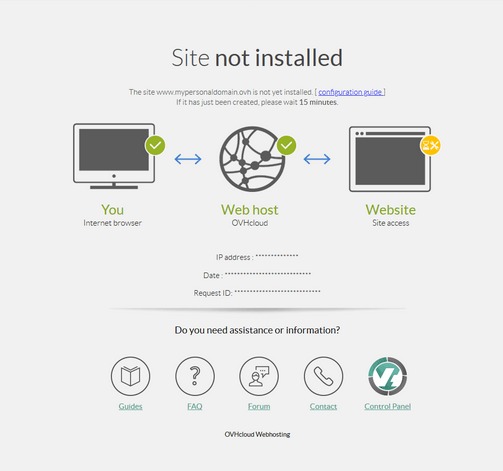
A domain can resolve to the right destination while the website stays down. DNS resolution, web-server routing and TLS certificate provisioning are separate operations.
A nonprofit administrator hit this while moving a site to Wix. The domain sat at Network Solutions, and propagation checks passed while the site stayed down.
In 2026 the organization wanted a new website with Wix. I trusted the DNS process Wix laid out without really understanding what was happening until it failed multiple times. Last week: updated to Wix’s nameservers within Network Solutions (domain). There was a CNAME error on Wix, so I fixed that today with support. I checked on whatsmydns and everything is coming up green checkmarks propagation-wise, but the site is still down. I would love any ideas for troubleshooting. Our email still works. EDIT: thanks for your thoughtful responses. Didn’t feel comfy sharing the domain since I was hired to design this website and posting about it on reddit wouldnt be the best look. But you helped me figure out that Wix just wasn’t issuing the SSL, so I called up and got someone to manually push it. It’s up now. Thanks everyone xoxo
Network Solutions held the registration, while Wix ran the new site and the SSL provisioning that failed.
Once the address records resolve, test the web service with a read-only request:
curl -vI https://example.com/
The -I option requests HTTP headers, and -v exposes connection and TLS diagnostics. A certificate trust or hostname error points to TLS.
A valid HTTP response means the server answered. Some servers reject HEAD with 405 or 501; use a GET request then. Do not disable certificate verification to make a failed test pass.
The apex and www can lead to different destinations. A failure on one says nothing about the other.
A nameserver change also affects services that depend on your DNS records. Mail uses MX records for routing, SPF, DKIM and DMARC rely on TXT records, and other applications use verification records or CNAMEs. Before you change MX records, DKIM signatures or mailbox ownership, read business email hosting and DNS authentication requirements.
If mail or a verification-dependent service broke, compare the records it requires with the live authoritative zone, then send a test message and check the service’s verification status.
A full email migration needs its own plan. If MX records, authoritative nameservers or SPF policies change, follow the web-hosting migration plan that protects email.
Apply the smallest safe fix and prove the domain recovered
Save the current configuration before you change production DNS. Make the fix in the account of the party that owns the failed layer; the table at the top lists the owner for each failure.
Be careful with rollback. Pointing the nameservers back to the old provider changes the DNS source for the whole domain.
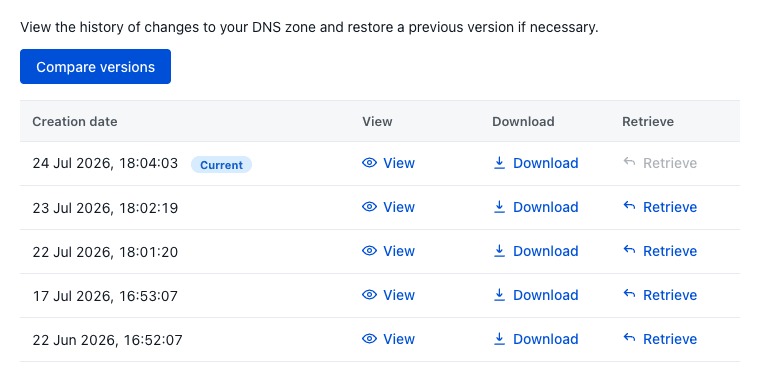
The old provider needs a known-good zone with the records your website, email and other active services use. Its DNSSEC state must also match the delegation you restore.
Without those conditions, a rollback swaps one outage for another.
Record the change
Keep a short before-and-after record: domain, hostname, time of the change, parent delegation you observed, DNS response codes and the exact setting you changed.
Change one provider at a time. Editing several at once hides which change caused the result.
Verify the corrected configuration
After the fix, confirm each layer the incident touched:
- Published delegation: The parent zone lists the intended nameservers.
- Authoritative operation: Every delegated server returns the expected authoritative response for the zone and requested records.
- Recursive resolution: Independent recursive resolvers match the corrected configuration, apart from cached responses that have not expired.
- Website operation: The affected hostname reaches the right site, and HTTPS works.
- Dependent services: Any email or verification service you affected works with its required records.
If the incident is still open, send the responsible provider the nameserver set you intended, the parent delegation you observed, the direct SOA and address-record results, recursive response codes, any extended DNS error, DNSSEC findings, affected services and the changes you already made.
Google Public DNS’s domain troubleshooting documentation explains how to read DNS responses and authoritative-server failures.